Earlier this Spring we learned that Google planned to abandon Reader (the RSS reader) and many of us wanting to be proactive began looking for alternatives. While some believe social (Twitter, Google+) has replaced the practice of following multiple information sources (mostly blogs) searching for enlightenment, I still invest time in specific individuals I think provide useful content and believe the accumulation of comments from these individuals offers something of value beyond isolated new ideas that may be surfaced through recommendations.
Anyway, my present choice for reader/aggregator is Feedly. I abandoned Reeder (different from Reader) because originally it appeared that Reeder was just a way to explore Reader feeds. I know this may seem confusing to those who do not use RSS. Now, the Feedly blog suggests you may not have to move to Feedly from Reeder. I realize this is counterintuitive, but this is because I explain a possibility raised in the Feedly post Feedly may not have intended. Feedly intends to play the roll Reader played in serving as a source for other readers (usually because the other readers were more attractive or offered some other useful feature) and to develop the capability before Reader goes away.
If you follow edtech blog or twitter feeds, you likely encountered the description of a recently released study concluding that providing computers to low income middle school students (mostly) did nothing to improve their academic performance. I first encountered the description of this study on TechCrunch. This study has not been published, but has been released as a working paper. I located the paper by way of a search for the authors (the TechCrunch link points you to a site that wants to charge you for the paper).
Since TechCrunch could not argue that placing computers in the homes of families with low income improved academic performance, the authors concluded:
This means that the likely culprit is far more insidious: the family and environment. I taught at-risk youth for years and saw first-hand how parents who didn’t prioritize college paralyzed their eager children. In my home, it was expected that I go to graduate school before I even knew what it was
This conclusion (possibly accurate) reminds me of a study conducted by James Coleman back in the 1960s.
Let me provide a little more detail about the study (read it yourself if you want) and encourage you to come to your own conclusions. This is the type of assignment I like to require of graduate students. I want them to make decisions based on research, but I also want them to consider research with a critical eye.
Farlie and Robinson secured a large number of refurbished Windows computers and made them available to children who had no access to computers at home. They did this in a way that would eliminate concerns often raised with nonmanipulative research. They first identified children without home access and then then gave the computers to half at random (everyone received comparable equipment by the end of the study). This was pretty much it. There were no instructions for parents. I am unsure regarding Internet access but the computers had an ethernet card and modem.
The study found no treatment-related advantage in grades or standardized test scores. In comparison to the control group, the experimental group spent .8 hours more per week using computers for school work, 8. hours more for games, and .6 hours more for social networking. This confused me for a bit, but time at school and the homes of friends counted so all students did have some access. There was no significant difference in time spent on homework.
So, do you reach the same conclusion as the author of the TechCrunch article? I recall a comment (I attribute to Larry Cuban, but I am not certain) that tech advocates do not admit what they propose does little good, they assume that the resources were not sufficient, something was done wrong, etc.
What arguments can you generate that do not fit with this criticism? Would providing some training or suggestions for parents be a good thing to do or would such a suggestion not be a difference associated with SES?
Here is a criticism that occurred to me. I would predict that teachers did nothing to take advantage of the technology made available to students. How could they? Not all students could be assumed to have computers. Hence, little could change with the type of assignments teachers could offer.
I have encountered a privacy issue with Google hangouts that it seems Google has not considered. I am teaching a small graduate class and we are using Google hangouts. The quality of hangouts is better than the service purchased by the university and easy to use as well. Because I meet with these online students at a specific time, there are occasions when all students cannot attend. This situation is common when a course involves working students who may attend from several different time zones. Hangouts offers a convenient method for saving and serving video from the class. Hangouts “on air” saves a session to YouTube.
Here is the issue and the option it seems Google may not have considered. I am not particularly interested in opening up the class to causal observers. This is not a problem with a hangout as you can invite those in a circle and this limits access. However, if you also want to record the session, Google appears to assume you want to make the hangout public. This reveals the live feed in Google+.
My assumption is that Google assumes those wanting to share a video on YouTube in the future also want to make the video available as recorded. This would make sense in situations in which it was desirable to offer a video feed to more than the 10 individuals allowed to participate. The situation in which you want to limit access seems to have been ignored.
I suppose this was the case with last year’s summer class as well and I just did not realize it was happening. When participating in a hangout, one would seldom also watch the stream in Google+.
If there is a way to avoid this situation, I do not know what it is (perhaps it new options are available in the upgrade just released). The best I can do is to delete the announcement of the hangout in the Google+ stream after the class session has ended. This is not a serious issue for me, but it just seems strange that the opportunity to limit access to a circle (or circles) is then reversed by also making anything saved to YouTube a live public feed.
After completing my previous post, I have continued to explore this topic and have encountered other very similar concerns (some more focused and eloquently presented). Here is a two part series from Anil Dash (ThinkUp)
This isn’t our web today. We’ve lost key features that we used to rely on, and worse, we’ve abandoned core values that used to be fundamental to the web world. To the credit of today’s social networks, they’ve brought in hundreds of millions of new participants to these networks, and they’ve certainly made a small number of people rich.
But they haven’t shown the web itself the respect and care it deserves, as a medium which has enabled them to succeed. And they’ve now narrowed the possibilities of the web for an entire generation of users who don’t realize how much more innovative and meaningful their experience could be.
Tug of war – Convenience or Losing Control – A comment on the brief history and the future direction of the Internet
Alternate title: Don’t Know What You Got (Till It’s Gone) (Cinderella)
Sometimes, if you says enough stuff, you end up contradicting yourself. I find myself in this quandary. When writing for educators, I argue that efficiency is important when asking students to work with apps, online services, or software. Spending time learning a tool takes time away from time learning with the tool so select wisely and use frequently. However, on the personal level and taking the long view, I hope we do not settle in to the use of such a small number of services that the rest are unlikely to survive and no options are unlikely to emerge.
The case for efficiency
It is not about the technology, it is about …..
This is a popular refrain. Among educators, the wording might go – it is not about the technology, it is about the learning. I doubt any educator would argue the extreme version of this straw man argument. “No biology this semester. We are going to master Google Spreadsheet!”
The true concern is that advocates should push a tool only to extent that the tool offers some advantage. This is a popular theme in education. For example, Microsoft Word is worth learning only to the extent that the product improves the efficiency or quality of writing. Extensive use of a few products might make more sense than one-time use of many products.
The case for diversity
A big part of my original attraction to web authoring was the feeling that it offered me a voice. This may have been an illusion, but the feeling of visibility was sufficient to encourage a great deal of effort. I read more and I read more widely. This increase in the content I reviewed in combination with the thinking required to craft a public product seemed productive for someone in my line of work. Again, maybe an illusion. Still, I encourage these activities. Cognitive psychologists might describe activities such as these as generative. Activities that push a bit and make us think.
Here is where a different perspective emerges. As activities become popular certain forms of change are inevitable. Popular apps and services present opportunities for those looking to make a buck. The expertise that money attracts can offer users greater ease of use and power. Simply put, those with money have an advantage. Money attracts skill.
Attraction to the tools and services that are easiest to use consolidates users making options less attractive. Over time, however, a narrow focus can limit rather than improve productivity. You probably realize how this might work. Sometimes there is something better, but you already know how to do what you are already doing AND your friends are using the same tools. Facebook makes a great example. Using Facebook represents the limit of many of my relatives digital skill and I must spend time in that environment if sharing with them is something I want to do.
Without arguing the quality of the attributes of Facebook or similar popular services, an unintended consequence (or intended if you are part of the company attempting to attract users to generate create greater profits) is a reduction in options and a dumbing down of users. The case made in Program or Be Programmed is that users fit their use to the affordances of the service – we do what is easy to do. The author argues that we may give up more than we intend as a consequence. Power and money (too often the same thing) are concentrated within fewer and fewer companies and further within the high ranking officials of the companies that attract the users. Companies begin to product what they have done rather than moving on to better products.
The solution – I suppose the solution is to recognize the narrowing of opportunities and to commit to using a variety of resources. There is more to the online world than Facebook and Twitter. There is more than the iPad.
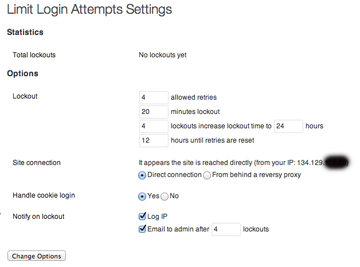
Several posts have indicated that WordPress blogs are being hacked. The approach involves a process of guessing (via a program) at passwords.
Since this approach likely takes many attempts, a practical and easy to implement defense is to install the plugin “Limit login attempts.” Just search for this plugin. The plugin provides some useful info. It works by refusing to accept request from an IP after a specified (by you) number of unsuccessful attempts. It will store this IP and send an email if you like.
I am an academic. That means, in part, that I read for a living. This is not the type of reading you do to put yourself to sleep, but the type of reading you do so you know how things are done or what is presently the best information in a field that changes quickly. Reading becomes the basis for teaching and for research.
Books are seldom the focus of this work. Books are secondary sources. I may write books, but I read books to keep up with the competition and seldom to learn something new. Academics read periodicals (journals) that describe the most recent research and thinking. This material is written in a specific way with specific characteristics. This way of writing is not intended to be entertaining in that ideas are expressed in creative ways. This writing follows a pattern that is intended to communicate clearly and establish the basis for all claims made.
I am constantly looking for tools and techniques that would improve my work flow as I do this kind of reading. This was true even before the days of personal computers, I have explored many “systems” in the time I have access to technology.
My most recent set of expectations would look something like this:
Store and organize pdf files – Journal articles are not provided as pdf files. A system I use to deal with this content should allow me a way to keep track of the documents and the document-related content (notes, highlights) that I create in reaction. Organization is mostly about retrieval. Will I be able to locate something a year or so later I know I read but now need access to the original to check on specifics and to retrieve details?
Highlight and annotate individual files – I like to think of what I do as “processing information inputs”. Reading allows some mental processing, but it helps me if I also do things like highlight and take notes. To some extent, this allows thinking beyond the information given and it also externalizes and stores ideas for future access.
Synchronize files across devices or with cloud storage for purposes of backup and flexible access – When I was younger, I nearly always went to the office to work. I spent a lot of time there in the evening and on weekends. One of the reasons for this was that the office was where my stuff was. It was also distraction free. As I became more secure in my career, this lifestyle became less attractive. So, I would haul a large brief case between my home and office each day. Moving to a more digital and online approach changed this. What I need now is internet access and online storage. My huge time investment in this process also encourages concern for backup. I was never that concerned that I would lose my file cabinets, but I am concerned that resources I store on a specific computer may disappear.
Export selected files, annotations, and citation lists. – One of my concerns when committing to any digital service involves the ease of getting my content out of the system. What happens if the system is discontinued or the conditions of use change in a way I find unacceptable? I want the opportunity extract my content from the system.
I have two recommendations. There is a free version (level) for both and this may meet the needs of most. I have found that I need to “hack” both in a way to meet my interests, but I have found work arounds that allow me to adjust the systems.
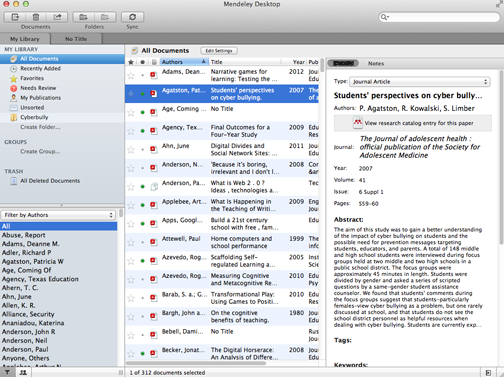
Mendeley allows you to upload pdfs to the cloud and to download pds from this site. You can access the cloud resources from multiple devices (including the iPad). The system includes a pdf reader allowing annotation and highlighting. Annotations and highlights are not automatically moved across devices, but you can export the pdf with your highlights. I must admit to being confused by why the tool would be designed in this way – when at home I want to see the highlights I added at work.
The free version now comes with 2 gigabytes of storage (this was just upgraded from 1 gigabyte of storage when Mendeley was purchased by Elsevier). I must admit I am uneasy when conglomerates buy up tools (Elsevier publishes many academic journals) because I can imagine self-interests eventually imposing limitations.
To give you a sense of what 2 gigabytes provides, I presently have 315 pds stored and I am using approx 250 MB. My one complaint related to storage space concerns the gap between free and the lowest paid version. Two gigabytes is free and 5 gigabytes is $5 a month ($60 a year). Consider what purchasing 25 gigabytes of storage through say Google would cost ($30 for 25 gigabytes).
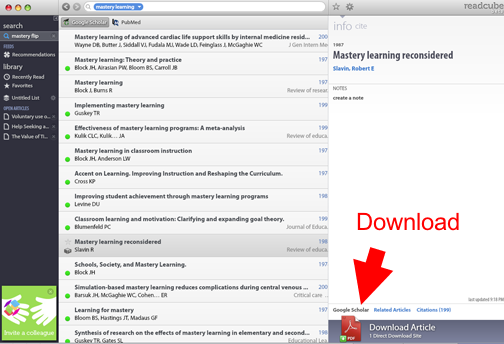
ReadCube offers similar features, but saves pdfs to your computer. I found a work around by saving to a folder I synch through Box. I have 50 gigabytes of storage through Box so this eliminates the storage and synchronization issue.
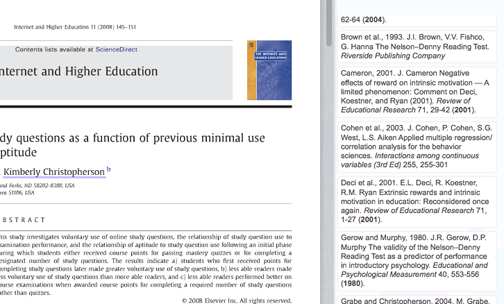
ReadCube is different from Mendeley in that it is also a discovery and download tool. The system recognizes that I have access through my institution and allows me to download pdfs because of this affiliation. I can search Google Scholar or PubMed (Google Scholar for me), read the abstract, and download the pdfs for most recent citations I identify. In some cases, there is also a feature called “enhanced pdf” that accesses the reference section of an article and allows me then to use this list to identify cited sources I can also download.
The ReadCube funding model is kind of interesting (if I understand it correctly). The model is described as iTunes like which I think means a fee is charged for the download of individual articles. The price of what this article describes as the iTunes model would be difficult for most of us to cover. The work to review articles for a paper could easily run to several hundred dollars for a given piece I might be working on. It almost assumes grant funding. In addition, while students read far few articles, the cost of what they do read would have a larger impact. At the level of the institution, I would be very surprised if subscriptions through the library will not continue to be the most efficient model. If ReadCube could negotiate a more moderate rate from publishing companies based on a greater volume of business, perhaps something close to an iTunes model will work. At present, ReadCube recognizes my affiliation with a university and allows my to access resources because the University has committed to the subscription model. So, it is not my situation that concerns me, but rather the survival of the company based on the business model assuming customer payments.
Manage Consent
To provide the best experiences, we use technologies like cookies to store and/or access device information. Consenting to these technologies will allow us to process data such as browsing behavior or unique IDs on this site. Not consenting or withdrawing consent, may adversely affect certain features and functions.
Functional
Always active
The technical storage or access is strictly necessary for the legitimate purpose of enabling the use of a specific service explicitly requested by the subscriber or user, or for the sole purpose of carrying out the transmission of a communication over an electronic communications network.
Preferences
The technical storage or access is necessary for the legitimate purpose of storing preferences that are not requested by the subscriber or user.
Statistics
The technical storage or access that is used exclusively for statistical purposes.The technical storage or access that is used exclusively for anonymous statistical purposes. Without a subpoena, voluntary compliance on the part of your Internet Service Provider, or additional records from a third party, information stored or retrieved for this purpose alone cannot usually be used to identify you.
Marketing
The technical storage or access is required to create user profiles to send advertising, or to track the user on a website or across several websites for similar marketing purposes.

You must be logged in to post a comment.