We are headed off to Florida for FETC (Florida Educational Technology Conference) this weekend. It will be a good break from the weather in North Dakota.
I am certain that “maker” sessions will be popular at FETC. My suggestion for the best session available to you will not be held at the convention center. If you have the time, visit EPCOT and pay the extra charge to participate in the “Behind the Seeds Tour”. The tour provides a behind the scenes look at the “Living with the land” exhibit. There are multiple greenhouses and on-going research programs.
I have long felt that school gardens and habitat projects have a great deal to contribute in terms of hands on learning. The tour provides a look at some of my favorite topics – hydroponics, small space gardening, drip irrigation, construction of growing containers. The guide we had explained how they repurpose PVC pipe and styrofoam containers to grow fruits and vegetables. I remember there being handouts and make sure to bring your camera. There is a charge but I remember it being quite reasonable for the duration of the experience.
The District of Columbia Court of Appeals just ruled that the FCC’s position on net neutrality sometimes also called the open Internet was not warranted. Net neutrality concerns a service provider’s authority to control the rate at which specific content can be sent through the system they provide users. They can prioritize some content over others. I continue to search for a way to explain what this is like and am always in danger of misrepresenting what is actually the case. As an analogy, I think it is fair to contrast the present situation with a toll road. With an open system, the price charged for a car or truck is set. If the new rules could be applied to the Internet, a toll road going through Detroit might allow American made cars to drive at 70 while limiting foreign cars to 45. Or, perhaps, there would be 10 toll booths for American made cars and 1 for foreign cars. The idea is that the self interests of the provider could come into play in influencing business opportunities that would likely be considered going beyond providing a service and making a profit on that service.
Positions on situations such as this are often spun in different ways. The providers wanting greater control point to what is argued as a misuse of the present system. For example, the proportion of Internet traffic that now is taken up by companies such as NetFlix has been used as an example. The providers argue they do not benefit in trying to keep up with the demand that is generating profits for a small number of content providers. A similar argument is made claiming that a substantial proportion of bandwidth is used by services that provide a conduit to what is often stolen content (music, video).
I am not certain I understand the first argument. I know that to connect a server to even an individual a provider expects a higher monthly fee. The content provider also pays a differential fee depending on the amount of content served. Part of the issue seems to be the concern that the provider could prioritize certain providers over others and who would determine when this was appropriate? For example, Internet services come to use from two likely categories of providers – phone companies (DSL) and cable television companies (cable). These two categories of providers have several income streams – there is the Internet access and there is either typical phone services (telephone calls, perhaps SMS) or content (television programming, pay per view content). There are potential conflicts of interest here – the phone company may see VOIP as a competitor (facetime, Skype) and the cable company may see free or commercial video (e.g., NetFlix) as a competitor.
There are other issues. The “right” of a company to offer services as it sees fit is often justified arguing that customers not finding the service acceptable can simply take their business elsewhere. However, many of us have only one option (and often not a good one) for a connection to the Internet. This has been a long standing issue with phone and cable services and regulatory mechanisms have been put in place over the years to deal with such monopolistic situations. In fact, to return to my original analogy, the government at some point created the interstate highway system because access to ways to move physical goods was considered a right for all citizens.
Anyway, how Internet access is made available is a challenging and politicized issue. The issue was first raised in the 2007 – 2008 time frame and I wrote about it at that time. My concern was not as a user, but as an advocate for students. I assume that government subsidies such as the e-rate will support school use, but the increasing reliance on online resources out of school will contribute to the to existing problem of income-based inequities. I am also concerned as an educational content provider. I personally subsidize the resources I provide, but I am concerned my server costs will increase. Sometimes I am concerned that my perspective is self serving. I am pleased when I see a similar position taken by others.
The MacBook Pro that used to be my main writing machine quit working. I knew the end was coming because it had to be plugged in to work at all. For some mysterious reason when I launched it a couple of days ago, the trackpad worked but not the buttons. This problem was there even when I tried a mouse. I have several new machines and no longer work on the old machine, but I always assumed I would take the time to move my content (pics, tunes, documents). Now, it is too late. This is a description of what I did next and the process may be valuable to others.
I kept a backup of the MacBook Pro using time capsule. This approach has advantages and disadvantages. It is easy. I kept an external drive at the office and connected it to update the backup from time to time. With time capsule you can recover a file you have purposely deleted and you can restore the entire drive if necessary. It turns out you can also use Time Capsule to move specific content to a new computer. This is not the ideal use for Time Capsule, but it can be done.
Here is the approach I used.
1) Migration assistant (an Apple utility) will connect to the Time Capsule content stored on an external drive. There are several options one of which allows the transfer of categories of content.
2) When using migration assistant in this fashion, the software creates a new user account on the new computer. You may not have known that a computer you use allows for multiple users with unique content. Keeping the content separate is the key value here. This guards against overwriting the existing content within a given category (e.g., documents). This is a necessary step, but not the organization that was my ultimate goal. I do not want to move among different user accounts to access my content. Hence, this is an intermediate step.
3) Once the content has been transferred and I am certain it is available, I erased the content of the external drive and moved the content from the second account back to the external drive. The content is no longer in the format required by Time Capsule (which is a good thing) and individual files can be accessed. You might want to use a second hard drive if erasing the originals make you uncomfortable.
4) At this point, I can connect to my original user account and integrate the files I want. I can move music into music, pictures into pictures, and documents into documents.
5) When I am certain I have what I want where I want it, I can delete the temporary user account using Apple preferences. This frees up space on my computer.
6) Finally, I can use Time Capsule if create new backup of the contents of the new machine on the external drive.
I have used this process one time. Because the way I use technology has changed (I am now mostly working in the cloud) and technology has changed (Apple allows me to download applications I own to the same machine or different machines multiple times), it is unlikely I will use it again. However, it worked for the situation I encountered and may fix a situation others encounter. If you are careful when moving from step to stop, there should always be a backup should you make an error and need to try again.
Sometimes things annoy when perhaps the should not. Right now all of the tech types who have “found coding and making” kind of annoy me. When you do what I do for a long time you develop a sense of history about things and this perspective includes the ideas that have come and gone and the topics various people have promoted. I would avoid the promoters (those who want to come to your school and help teachers learn to promote coding) and consider those with actual experience – those who teach computer science or are experienced programmers (I like the 10,000 hour rule). It would be great if those experienced teaching such courses also had experiences solving applied problems by programming, but I would imagine this would be a small pool.
What makes sense to me:
An extended experience with programming (a class).
Elective programming experiences – in school or out.
Realistic expectations for what will be accomplished by a reasonable amount of experience programming.
Related issues – I have commented on these issues elsewhere, but allow me to summarize here:
Those who promote a new “class” have to argue for the opportunity. If it is assumed that the class should be taken by many students, it might be useful to understand that the curriculum of schools is somewhat of a closed system. In other words, if you want to add something, what should be deleted. Would the math department allow a programming course rather than one of the more traditional courses? Who would teach the course? This issue is less of a challenge if programming is offered as an elective course.
In general, I think we must be conservative in our expectations for the breadth of transfer from learning experiences. When finished with a programming course, the level of proficiency in writing code is what has been accomplished. There may be some transfer to other programming languages and some insight into the use of programming (computer literacy or some more general term implying insight into uses of technology), but I would hesitate to make addtitional claims. Computer literacy or learning about and not with technology was once being discouraged. I am not certain why, but this is still pretty much what you get. There is nothing wrong with such outcomes as long as this is what we want.
It has become popular to describe the goal of coding as “computational thinking”. Here is an extended discussion of what ISTE thinks this means. A similar perspective was being advanced with LOGO was in vogue and considerable research activity was generated. I followed this research quite closely and included a chapter on programming in our textbook edition of the mid-90s. My review of this research is still what shapes my thinking regarding expectations and transfer (see what makes to me). Connected limited programming experiences to the development of generalizable, higher order thinking skills is a significant stretch. I actually thinking writing to communicate is a better candidate for the development of higher order thinking skills (read my review of the requirements for transfer) – it is versatile and experience can be developed across the curriculum. Hence, I think you learn to program if you want to learn to program. Using programming to develop other skills would likely require more time than the K-12 setting can make available for most students.
For this post, I must first get you in the right frame of mind. We are spending the holiday break at our cabin in northern Wisconsin. It has been very cold so each morning when I get up I check our Ecobee to see just how cold it is. It was -27 this morning (this translates as it is probably too cold to get the car started). The Ecobee also posted a warning message which could be summarized as – your furnace is not working.
This is precisely the reason we installed this device. Most of time we would not be in the cabin and due to one issue or another the heat may not come on resulting in frozen and possible burst pipes causing all kinds of damage, etc. The Ecobee is “smart” (see my description of the data it collects on our heating and cooling) and sends us an email should there be a problem we need to address. Sure enough, an email arrived.
This system seems to work great unless the power is out which knocks out our wifi making the system pretty much useless. I would think the company could ping the thermostat and send us an alert that our protection system was offline. Anyway, it worked great this time.
The problem turned out to be a lack of propane. We have a contract that is supposed to result in our tank being filled without our intervention, but evidently there was an issue with getting this done. They explained that they had planned to fill our tank on the 18th. Their usage calculations evidently do not adjust for very cold weather. I am thinking this might be a long term problem so some discussions are in order.
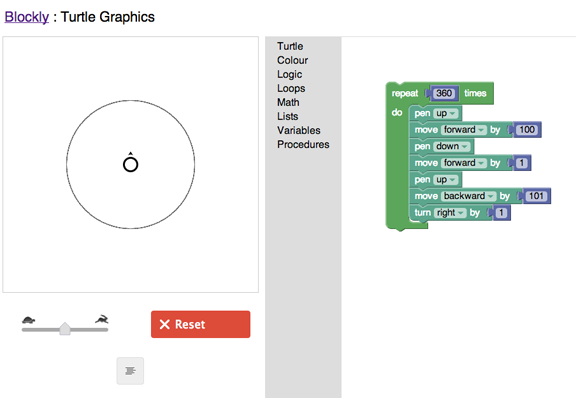
One of the things I remember from reading Papert (Mindstorms I think) was his explanation of different ways of understanding. He claimed that computation offered a different way of understanding. One example which I think was from the same source concerned the understanding of circle. The demo goes something like this.
Most of probably remember the definition of circle – a closed plane figure consisting of all points equidistant from a point. The ability to produce this definition does not really mean we understand it. He proposed the following demonstration (I hope I am remembering the source appropriately). You can turn this definition into a program (logo).
This demo was generated in Blockly. If you follow the code, you should be see how the code expresses the definition.
The theory and application of mastery learning has long been a professional interest. The origins go back to the 60s and some crude variants to even earlier models of instruction/learning. I have also presented some of these ideas in my educ psychology classes for years as an alternative way to understand learner aptitude (time to learn). In recent years I have added a component focused on the Kahn Academy. My students find Keller and Bloom to be what they call “theoretical” (even though there were clearly applications of each), but they are intrigued by Kahn. One student wanted the link today because he wanted to try the modules on biochemistry.
I have watched with interest the evolution of the Kahn Academy. By evolution, I mean the earliest version did not promote the flipped classroom (a different use of class time) and mastery learning (very similar in my thinking to Keller’s PSI). I wonder about this evolution. Is what we see now closer to the original “grand plan” or have those developing this system found that what was being developed were great ways to implement existing “big ideas”?
I do discover something new each time I prep for my presentations and visit the site to review the features. This time I discovered the separate content on programming. Educators (e.g., Maker movement) have been rediscovering programming and the Academy offers an interactive experience based in Javascript.





You must be logged in to post a comment.