Search limitations

I have had this question about the power of search that I finally thought of a way to investigate. My question involves the power of search to locate content in sites that use a database backend. So, instead of independent web pages this would be systems that generate a web page on the fly by accessing a database to retrieve content as requested. Blogs work in this way. So do content management systems such as Concrete5.

I am guessing that the search spiders find the static front page of a blog or content management system, but would not necessarily trigger that source to pull up content from the database so that it could be indexed. My concern has been that resources I offer within a content management system are not going to be located when someone searches for something the stored content might address.

Here is how I tested my concern. I recently switched from content stored as individual web pages to the same content stored in Concrete5 (a content management service). I did this so I would not have to continue paying for Dreamweaver to add content to my existing site or to modify existing content. Blogs (e.g., this WordPress site) allow a user to save content as pages instead of posts. These pages can be linked and thus can provide the same functionality as a site constructed page by page using an authoring environment such as Dreamweaver. Blogs and content management systems now provide access to themes and other features that make content creation far easier than used to be the case. If your content is fairly standardized (most pages look the same) and require only the presentation of content (text, video, images), why invest in an approach that allows far more flexibility but at the cost of efficiency and funds? There may be an answer to my question – searchability.

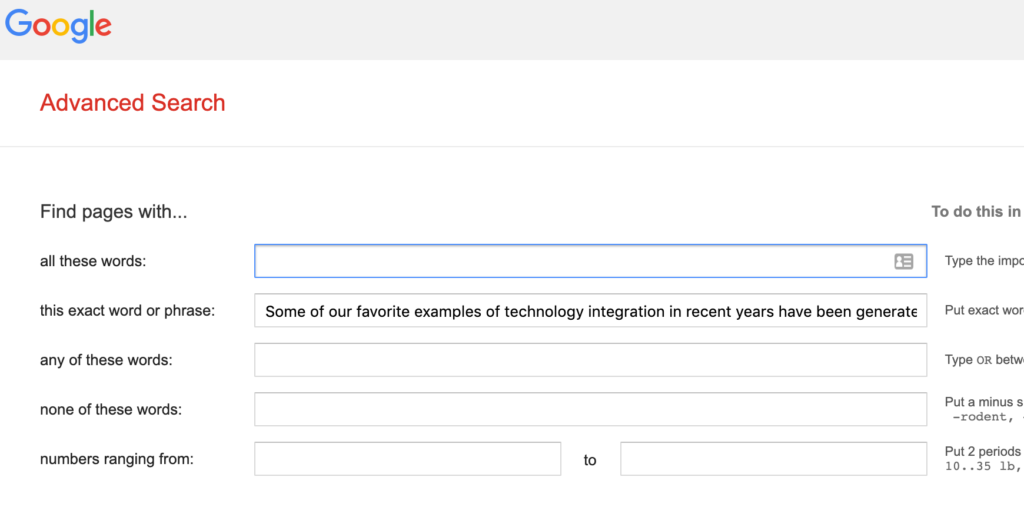
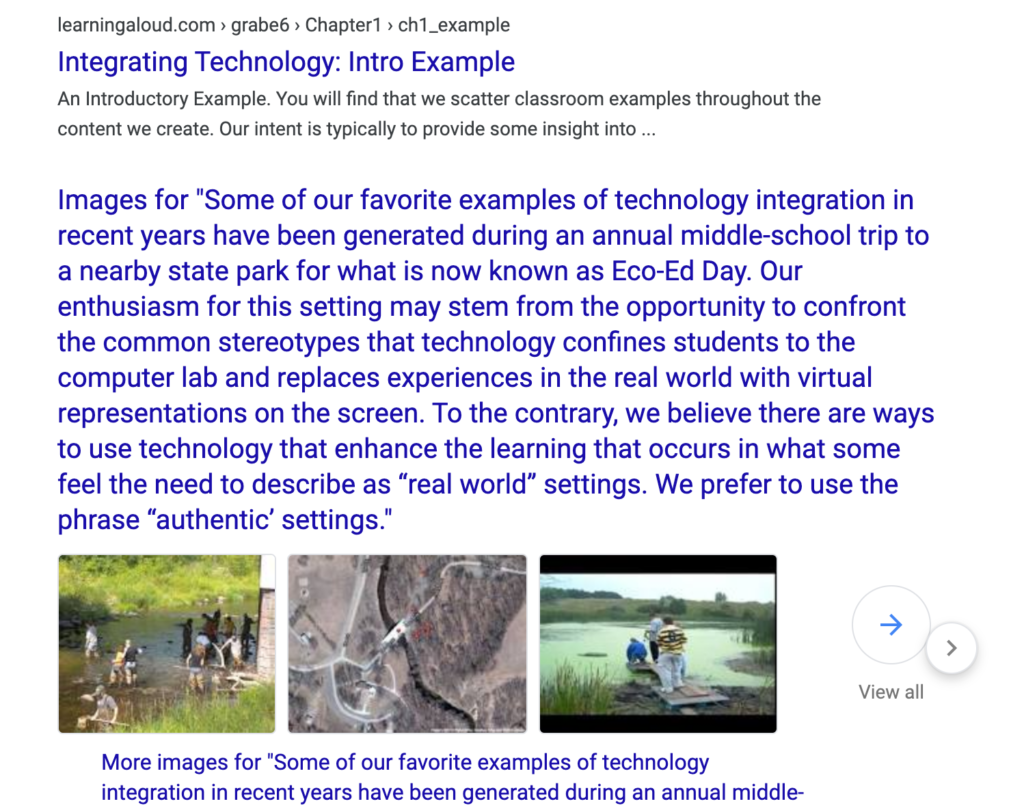
Anyway, my server presently contains redundant versions of book resources one in the form of independent web pages and the other in a database enabled content management system. What I realized was that I could do was conduct a search on a paragraph from this content (both sources) and see what was returned. Google advanced search allows you to search for an exact phrase (see second image) which I copies from a page within the database-based system. The same paragraph appeared on the original page-based site created with Dreamweaver. Instructors may have used this same technique when concerned that students have copied content from the web to include as part of their own writing.
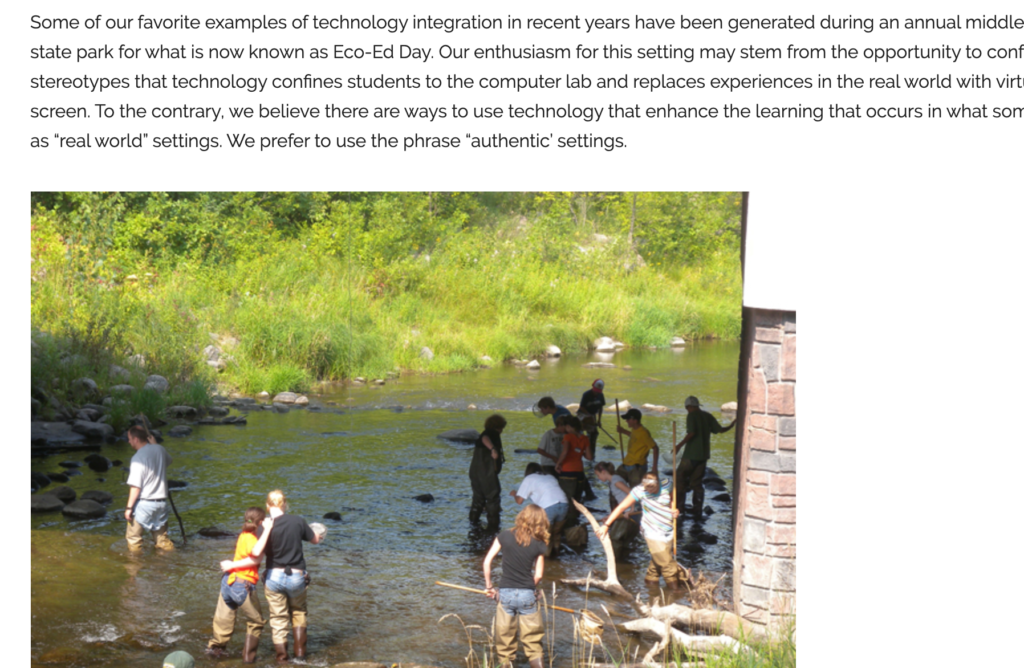
The results of the search confirmed my concern. The search located the page with the target paragraph, but not the same content from the active content management system.
I am now trying to figure out how to promote my content when it can no longer be located through search.

Loading

Online learning vs. remote instruction

The requirement to end the year teaching students at home left many administrators and educators struggling for answers. There was not much time to plan (perhaps what ended up being declared a week for Spring break) and many obstacles to overcome – homes without broadband access and young students (and parents) lacking skills with the delivery tools that were selected. Teachers might also have not spent much time with the tools they were expected to use or at least didn’t have the depth of experience necessary to troubleshoot the inevitable problems that arose.

Some districts simply gave up and called it good for the year. Parents complained of the additional demands they faced and the challenge of finding a way to supervise their children if they were able to work. Districts reported a high rate of no shows. Many were frustrated.

All of the issues aside, I hope educators and administrators have gained some insights as we may be facing the same situation in the Fall and not finding a way forward will not be an option.

As the year ends, I hope administrators query teachers and parents to find insights into what were productive tactics and that these positive experiences can be shared. I found this article from EdSurge that identified a source I had not considered. The article was titled How online learning research can improve remote instruction. My initial reaction was puzzlement as I missed the point. For some, teaching students at home is not novel. There are some students who learn at home online and some who work with students in this fashion. These students and educators have committed to this form of teaching/learning for a variety for reasons, but this commitment has resulted in tactics that work for such circumstances. Certainly, everyone involved has made a commitment to the approach and there are not issues of bandwidth, hardware, or experience involved. These are different issues. What might be helpful from what has been a niche approach at the K12 level are the experiences that been found useful.

Loading

Equity and technology use

The pandemic and related requirements that students learn from home have brought to my attention issues I thought we had moved past. My reference here is to data I have read locally (Minneapolis ara) about the numbers of students unable to participate in online efforts because of the lack of access. Schools had recognized this issue and made mobile hot spots available to families in need so students could meet homework assignments, but the more general expectations that are now in place revealed more need than schools could meet.

We have written a textbook since the middle 1990s and have included comments about equity. Looking at the history of our coverage, I can see a timeline of what we used as “marker variables”. In the early days, the marker was easily quantifiable and was reflected in the student to computer ratio. So, we would compare schools with a high proportion of students qualifying for free and reduced lunch with schools with few students needing this assistance. You would see values like 10:1 and 5:1. What would seem to happen was that the government would recognize such disparities and step in with subsidies such as the e-rate. The next marker was again quantitative and might be the proportion of school computers with Internet access. Soon, most schools were wired and we started to talk about issues such as 1:1 initiatives and more qualitative indicators such as the type of classroom tasks students participated in and the staff available to support educators.

The next disparity involved assumptions about whether homework could require Internet access and the proportion of families with high-speed access by income level or some other variable. I thought we had kind of moved beyond the quantitative differences to focus on the kinds of free-time home activities students focused on or the types of home devices (phone, tablet, computer) relative to equity variables.

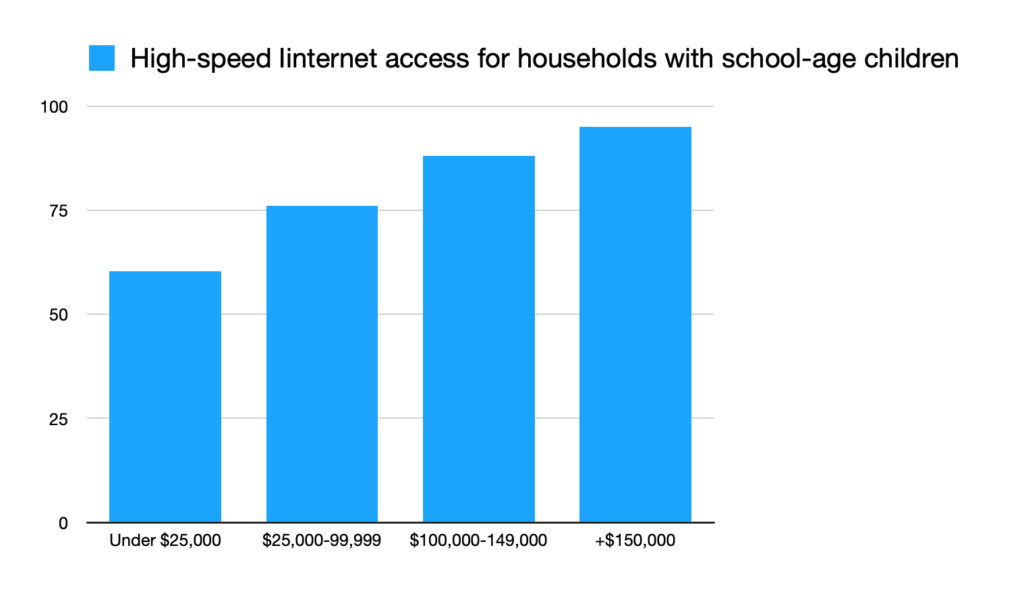
My surprise was that the pandemic seemed to indicate I had to back up along my assumed timeline with families claiming that children could not connect to complete assignments. PEW provides some data relevant to this issue. A chart based on these data appears below and PEW also writes that 25% of children in homes with less than 30K in income do not have access to a computer.

Loading

Running LOGO in Python

Learning to code as a cross-grade level educational goal seems an educational trend. I attribute this to two factors: a) assumptions about the vocational potential of having coding skills and b) the promotion that coding experiences develop computational thinking which while somewhat ambiguous seems a form of higher-order thinking.

There are many strategies for how to go about learning coding and what type of coding is appropriate for students at different grade levels. We include a chapter on coding in our textbook and I have generated related resources available online. One of the interesting issues I think has received little attention is the transfer value of learning in what might be described as a coding language and environment designed to teach core coding concepts while reducing many of the demands of working in a traditional programming language to the development of proficiency in the traditional language. For example, many of the educational coding environments for younger learners use icons instead of text. 

When I began writing about coding in the early 1990s, I mostly focused on the logic and specifics of LOGO. This was a text-based language, but somewhat forgiving when it came to syntax. Such text-based approaches eventually gave way to icon-based systems assumed to allow a focus on coding concepts without the demands of exact syntax.

A grad student in one of my classes was interested in the Python programming language and found that Python could import a subset of commands for LOGO. She was working on tutorials to guide students in the use of this implementation of LOGO. I had loaded Python on my Mac, but had not really done much with the language. I kind of need a project to motivate my exploration. However, I was familiar with LOGO and this was enough to encourage my exploration. What follows is my description of what others might do to explore. I see some opportunity in the natural transition that might occur using a language within a language. 

Getting your system set up was my biggest obstacle. I will explain why as I continue. 

Get Python from a reliable source

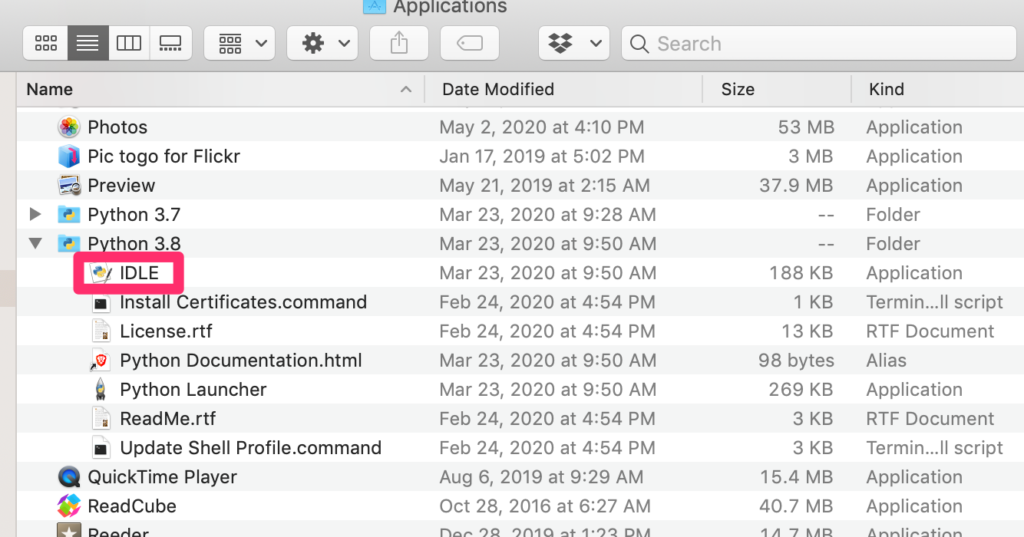
Python will be saved as a folder in your applications list. Python is accessed from the Terminal. The easiest way to activate the Terminal and Python within the terminal is to use the IDLE app that appears in the Python folder [see image]. I just drag IDLE to the toolbar at the bottom of the screen for easy access. IDLE is an Integrated Development Environment (IDE) including a code editor and debugger. The code editor is the tool within which you write Python code.

It is easy to find tutorials for Python on the Internet. The tutorials are great as far as the coding itself was concerned and my background allowed me to make assumptions about how things are accomplished via code. My existing experience with coding in other languages made exploring a new situation fairly easy. Once you are used to defining variables, loops, conditionals, etc., the basics come easily. I have not moved past the basics. What I struggled with were some very basic things I needed to know for saving, loading, and running code. I had to look around for a while to get past writing and running code within the IDLE window. The key came from a YouTube video that allowed me to understand that you simply open a file from within the Terminal and enter your code in this blank file rather than enter code in the Terminal and then save your work as a file. This is evidently so obvious to those creating tutorials that they fail to mention the difference. If you create two files in the ways I have described and examine what is saved in both cases, you immediately see the difference. 

There is little value of me developing complete tutorials as others have already done an excellent job. Here are a couple of resources.

Basics of Python

https://www.freecodecamp.org/news/the-ultimate-guide-to-python-from-beginner-to-intermediate-to-pro/amp/

Python Turtle

Python Turtle

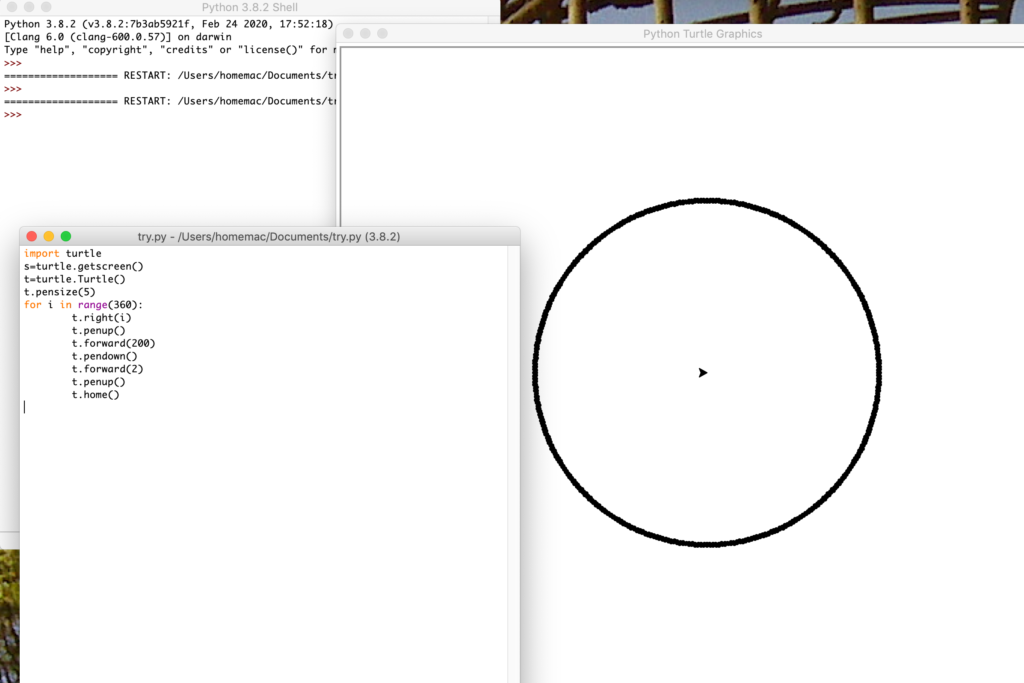
An example I like to use to explain Seymour Papert’s concept of computational understanding of geometry (in contrast to Euclid’s logical or Descartes’ algebraic approach) using the example of understanding “circle”.  The important insight here is what it means to understand and how is understanding different from recalling. So, if you have taken geometry you have probably learned the definition of a circle as “a closed plane figure consisting of all points equidistant from a point”. The circle program I write in LOGO demonstrates what this means. It starts from a point, moves forward the number of turtle steps specified, makes a point, and then returns home. It then turns one degree and repeats the process. Do this 360 time and you have computationally drawn a circle.

The following image demonstrates what this would look like. It shows the Terminal window, the commands in a new file window, and the window containing the result of running the program. 

This video shows the program being executed.

Loading

Teacher as Designer – Part 2

This post continues my discussion of teacher generated structured learning models. The first post considered hyperdocs and webquests. Here I will consider two tactics I use and for lack of well-used and promoted titles I will call the interactive syllabus and the layered online resource

Interactive Syllabus

The concept of an interactive syllabus is a concept I proposed as part of my interest in a different model of textbooks. When we parted ways with our publisher over our interest in a different approach to offering a textbook for what I sometimes describe as the “technology for teachers” course, one of the ideas in justifying the combination of a core Primer and online resources concerned the advantages of pairing down the traditional book and combining this Primer with a variety of online content. The online content offered the opportunity to keep content as current as possible, but also allowed an expansion of the material offered. For reasons of cost, a traditional textbook must make decisions about what is to be included. The existing publishing offering would likely contain things that were not considered valuable to an instructor imagining his/her course and would not include content the authors could have included but did not. For example, the authors probably did not discuss important research articles and how these studies were conducted for a course that might be assigned for a sophomore course for future teachers. Grad students might have been interested in the specifics of some of the key research articles that were used to justify specific classroom practices.

The idea of the interactive syllabus was proposed as a way to integrate the Primer and the author developed content an instructor could select to assign as well as other online resources from other sources the instructor wanted the student to read. The interactive syllabus was a way to structure the combination of resources and to link directly the resources that were online. [example]

An interactive syllabus need not be based on the model of a Primer and online resources as I have described. An interactive syllabus is essentially a web site with the home page representing the course overview and essentials and individual web pages identifying the content to be reviewed for a given unit/lesson and related activities. I have been using Google sites to create interactive syllabi for my own courses. A website is pretty much the basic model for all of these concepts whether implemented as interrelated blog pages, google docs, or some other way of putting content and links online.

Layering

Layering is another term I decided was descriptive of a group of online services suited to adding elements to existing web pages or online videos. To me, the idea was that educators as designers could add elements to existing web content as a way of improving the educational value of these online resources. The online elements could serve to activate existing knowledge relevant to the novel online material, to encourage processing of the online material, and evaluate understanding as a way to identify failed understanding and improve retention. These added elements could include highlighting, added comments, questions, links to additional information, discussion triggers, and similar supports for learning.

I have a collection of tutorials describing specific services and how these services work. I would also encourage review of an introductory video I created to explain the concepts of design and layering.

Loading

Hyperdocs, webquests, and other teacher created designs

A hyperdoc is not a webquest. This was the title of a post that got me started on this new writing project. I knew about webquests. I read everything I could find about webquests when they were the “in thing”. I assigned webquests and I wrote some of my own.

I have also explored the description of hyperdocs and assigned the Hyperdoc Handbook in one of the graduate courses I teach. 

My reaction to the claim that a hyperdoc is not a webquest would go something like this. As described by those who originated each model, I would agree that there are differences. At the level of the formal declarations by those originating the terms and the associated models, I would argue the webquest would be a subcategory of hyperdoc. I understood the concept of a webquest to be a scaffolded problem solving task and hyperdocs as more an approach to organizing a wider variety of learning experiences. However, at the level of application I don’t see a great difference. Many webquests were not really focused on problem solving and could be anything from direct instruction based on “read this content and answer these questions” to a type of Internet-based scavenger hunt. What both concepts share is the notion of an organized process controlled from a digital document of some type.

In this time of required online learning for all, I can understand how approaches of this type are being encouraged as ways for educators to think about how they might diversify learning experiences for students. It is not practical to translate the face to face classroom as an online experience. The issue goes beyond how long teacher and student will stare at each other via a computer screen. Part of the new reality is how to create guided learning experiences when the student does not have the same access to the teacher or other students. Guided learning tasks that can be organized through a conveniently referenced source make sense. 

From my perspective, webquests and hyperdocs and the logic of each are part of a broader topic I would describe as instructional design and more specifically educator as instructional designer. This broader perspective is based in an understanding of what learning is and how educators can encourage learning in students through the selection of content and the assignment of tasks intended to encourage productive cognitive behaviors. More on this in a future post or two and on some other broad teacher as designer approaches.

For those unfamiliar with hyperdocs, here are a couple of sources to offer you the core idea and to direct you to related resources. 

ENTER THE HYPERDOC

This source offers the following description of a hyperdoc and I prefer to offer such a statement so we can agree what we are discussing.

“A HyperDoc is a digital document—such as a Google Doc—where all components of a learning cycle have been pulled together into one central hub. Within a single document, students are provided with hyperlinks to all of the resources they need to complete that learning cycle.”

Hyperdoc portal

This is the homesite for the group that originated this model, wrote the Hyperdoc handbook, and offers additional resources and online experiences.

Loading

Zoom concerns

Many of us involved in education are using the video-centric service Zoom to connect with students and colleagues. This easy to use and powerful service has become very popularity. However, with this popularity have come legitimate concerns for security issues that have been documented and shared (Google concern, request for FTC probe, NY City schools).

Zoom is attempting to address the problems that have been identified and does indicate that it was not prepared for the heavy use of its service before all issues had been identified. Here is the link to my previous attempt to explain what I know about security measures you can take as a Zoom user.

Loading