I have edited this post multiple times as my experiences with this product and the upgrade to the product have resulted in different impressions.
I noticed today that this product has been updated (Apr. 22). I downloaded the upgrade and tried for about 30 minutes the routine that had produced corrupted files previously. At this point I have been unable to recreate the same problem so I am optimistic that the problem has been fixed. The web site did indicate that the file corruption problem had been corrected in the update.
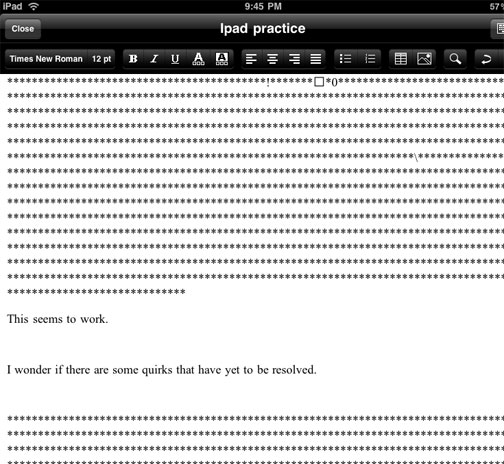
I am rescinding my endorsement of this product. I am experiencing consistent problems when resaving documents after an initial upload. This issue may be something I am doing wrong, but it seems consistent and I would not want to encourage purchasing of this product until I can figure this out. (Apr. 11). The image below illustrates the problem. My initial text (This seems to work.) seems ironic when saved as part of attempting to add new text to the file. The additional characters seem to be the type of content you see when opening a word processor generated RTF file with a text editor.
——————————-
Sooner or later, the answer always seems to appear.
Disregard my previous post indicating you could not edit Google docs from the iPad. A post from from jkontherun described the Office2 Pro app – for editing Google docs and other sources. Works fine.
Everyone who has an iPad seems already to have posted something to explain their initial impressions. I guess this should not be a surprise – there seemed to be a great deal of commentary, both pro and con, before anyone actually had the opportunity to use one themselves. Why would this change when the iPad became available. I have been trying to determine what I might add based on my brief experience with the device.
How about this – a pre-experience issue within the educational community concerned whether the device would encourage production as well as consumption. In other words, it seemed obvious that the device would be a great way to read books, explore web resources, and watch videos. However, information consumption according to some is over emphasized in education – for some reason listening to lectures is too passive and even reading books seems to be on the outs. Man – seems like just a few years ago we were worried that Johnny could not read and now we are concerned that learning from books is over emphasized. Experiences relayed from experienced and recognized authorities are possibly less valuable than personal experiences. This post is not about this “discussion”.
What about the production capabilities of the iPad? Well, it is widely known that you cannot take pictures or video. You can record audio. I was disappointed that I was unable to write in Google docs and I am not sure why. You can actually enter data in a spreadsheet (use the desktop and not the Google Mobile option), but I cannot find a way to enter text in Google docs. This disappoints me – I do most of my writing in docs. You can do gmail, Twitter apps, and blog entries (with one of my blog apps I could enter text in HTML, but not WYSIWYG mode). I do not understand these inconsistencies. I have been impressed by Pages (the $10 word processing app from Apple).
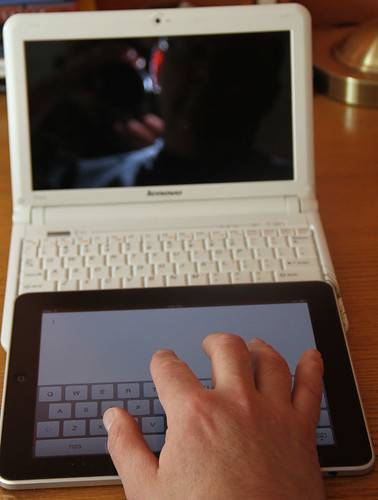
Here is a comment I have not seen addressed elsewhere. What about the ease of entering text? You can add an external keyboard, but what about the build in keyboard? I find that it was as easy and possibly easier to enter text using the on screen keyboard than from the keyboard of my netbook. Neither, in my experience, is as easy as using a standard keyboard. I had a hunch about why this was my experience so I lined up the iPad with my Lenovo S10. I would suggest that the iPad keys are larger and more widely spaced on the iPad. If you look at the image I have provided, you should be able to see why this is the case. The netbook keyboard is a bit wider, but the netbook “wastes” this extra space and more on keys the iPad does not have. The letters on the iPad are actually larger and more widely spaced.
Do note the size of my hand relative to either keyboard and it is probably obvious why I do better on a standard keyboard. Both the iPad and netbooks force me out of my well practiced keyboarding style. Still the iPad is a reasonable device for text input at least equivalent to a netbook and superior to mobile handheld devices (smartphones) some are willing to argue are effective in an educational setting.
Web developers are constantly looking for a niche to fill – a focus for a site that will attract a reasonable number of users. Some social sites are general and some encourage interaction around a topic or process. I would argue that Facebook is an example of the general approach and users can shape the general tool to their interests. In contract, a social bookmarking site (e.g., Diigo) is organized around a process (personal bookmarking) that has a social element (sharing bookmarks).
The books we read can become the basis for social interaction. Face to face groups that agree to read and then discuss a given book are common. In a way, this focus and the potential for a similar interaction has found an online niche.
I have two examples of this category of services. Both allow users to identify the books they have read, are reading, or want to read. Both allow comments on these books and opportunities for interaction. I have treated these services like I have treated the social music services I use (e.g., LastFM) – spend some time with the record-keeping capabilities of the service, but I ignore the social component. I am not interested in sharing concert experiences related to the musical groups I follow (I have no such experiences) and I am also am limited in the time I can spend interacting online so I mostly post comments on the books I read to my blogs rather than the book sites. So, I am not a poster boy for these services, but perhaps you find this focused topical sharing of interest. I do read the comments of others related to some of the books I have read.
So my two suggestions if you are interesting in exploring social conversations around books are:
I am not looking for a new social bookmarking tool. I use Diigo and once you invest for a period of time in a specific service making a change, even to a better service, is a tough choice. However, I read a recent description of changes made to the Google bookmarking system (Free Technology for Teachers) that peaked my interest so here is a brief description another new and useful service from Google. The new feature allows the assignment of bookmarks to lists that can be shared or kept private. It should take but a moment to see how this flexibility might be useful for teachers.
Rather than explaining the entire bookmarking system, I will focus mainly on the new list feature. But briefly, if you have a Google account, you can either add a bookmarklet or a Google Toolbar to your browser (Google instructions). The difference is pretty much whether the bookmark service is accessed from an icon that appears as part of your generic browser toolbar or appears as part of specialized Google toolbar offering additional services see below.
Selecting the bookmark icon from the menubar (either form) allows the current page to be bookmarked (stored by Google in contrasted to being stored by the browser as would be the case with browser bookmarking systems). The immediate advantage of off-site bookmarking is access from other browsers and computers.
Now when storing a bookmark, you have the option of also assigning the bookmark to a list. Lists are generated (see below) and then bookmarks are assigned to lists.
From the list of bookmarks, select a bookmark (checkbox to left of bookmark)
The trend that concerns me – youth people are showing less interest in blogging. In 2006, about 28% of 12-17 year olds blogged. Now, only 14% make the effort to generate lengthier posts about things that interest them. I thought that microblogs (Twitter mostly) would have taken up the slack, but this does not appear to be the base. Only 8% of this group post to the 140 character and less sites.
Social network sites (e.g., Facebook) appear to be the newest trend. Four years ago, 55% used such sites and now the proportion is approaching 75. Did I imagine this or were younger users once blocked.
Of course, Facebook is versatile. You can add a little or a lot depending on your mood. You are also connected to just that group that interests you. Finally, there is the option of accessing your site on the go (hence the title of the report – Social Media and Mobile Internet Use). Approx. 75% of teens own a cell phone and 58% of 12 year-olds have this resource. Amazing.
I find the decline in what the article describes as “long form” posts to be discouraging. Things now appear to be moving toward mobile commenting. This seems more a way of connecting than communicating. Not that the social component is important. Obviously, social connections are extremely important at all ages and particularly to adolescents. However, the benefits of crafting more well thought out comments appear to be in decline.
This blog has some strange characteristics. One seems to be that few follow this blog as a feed and a good deal of the traffic comes as a result of search. I guess I am not certain why this is the case. Perhaps this is because some of what I offer consists of tutorials. The most popular posts seem to be tutorials. It may also be that the ability to comment has been limited. I did this as a defense against what mostly was spam and not responses to the posts. I noticed that someone seemed to be attempting to respond to a post in which I outlined some of the findings of a recent Generation M study. Among other things I questioned the interest of some in the educational value of video games. I can see how some would want to reply. I do say things to challenge and I should do more to encourage response. I have tried to relax the settings to make it easier to respond. You still do need to register.
When I did my last post, I intended to quickly follow it up with another about storage applications. As is often the case, as I explore things in depth, I first become more confused and then learn something. As the name of the blog implies, I then attempt to explain what I have discovered.
So, I have been exploring applications and services suited to short term storage, organization, and transport. This is the type of thing you might do while working on a month long project. This is not general backup which would involve a lot more content and would likely be accomplished automatically in the background. Nor, is it what I would describe as a web clipping service – a tool used while working with web content to organize URLs, sections of text, and screen captures (e.g., Evernote).
The two products I will describe are Shovebox and Dropbox. Shovebox is a Mac product and Dropbox is cross platform. I use both connected between my Mac(s) and my iPod Touch. Dropbox is suited to sharing files across multiple computers and Shovebox is not.
What confused me while doing the background research for this post was my assumption that Shovebox was storing content in the cloud. I spent a considerable amount of time searching to determine the storage capacity you were given for the $25 you spend on the software and I could not find the number. It turns out that I had been using Shovebox under an incorrect assumption. There is no capacity limit because the product is designed to improve your workflow by offering an approach to storing content on your machine. Luckily, I had other backup options for the content I had stored. My recently, I became aware of Dropbox. This software does store content in the cloud (and on any synched machine). You get 2 gigabytes storage at no cost and the software is free (you do pay for the iPod app). If you want more than two gigs, you pay big time – $100 a year for 50GB. Seems strange there is nothing between free and $100 a year. Note my previous post on the capacity Google makes available for $5.
On the Mac, both Shovebox and Dropbox are available from the monitor bar (I am not certain what to call the bar at the top of the screen).
(left – dropbox, middle – shovebox)
Shovebox is intended to offer a strategy for intense work sessions. You pretty much drag files onto the icon and organize them later.
Files from a work session appear within the inbox. You then move them to folders that identify your projects.
Shovebox synchs with the iPod Touch via wifi. The synch process can be a little tricky depending on the wireless lan. I have trouble at the office, but things work fine at home.
Dropbox works as if you are dragging files into a folder. The icon allows access to the folder. Open the folder and then drag the files. The files are synched across devices and also saved on the web. You can access your web folder from machines without the software.
The iPod Touch makes use of wifi to synch.
You can do some other interesting things with Dropbox (drag files into a public folder and share them as web content), but this post is already too long.
I think many of us try many things and make use of only a few. I have files stored all over the place and both of these applications offer some useful features and some limitations. I guess finding the right mix of features at the right price point for a sufficient number of end users is the challenge for developers.
You must be logged in to post a comment.