Tools - Social Bookmarking (Continued)
Using Diigo in the Classroom
Diigo offers some special opportunities for teachers and educational institutions. Here, we will describe some of the opportunities such an account offers as a special case of Diigo groups. Traditional Diigo groups may be perfect for such educational applications as sharing useful web sites among teachers, but have security limitations which may be important when involving students. A teacher account offers a way to address these security concerns.
When accepted for a teacher account (free, but you must apply using a school associated email address), normal access will be updated to include a Teacher Console. With this addition, a teacher can set up protected accounts for students. Students would have similar opportunities in using Diigo to what have been described here, but their resources would not be accessible to those outside of the group designated by the teacher.
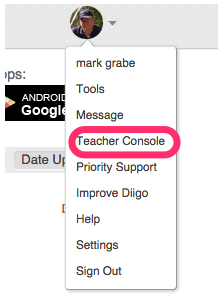
Once an account has been created, the Teacher Console option will appear under your personal menu header.
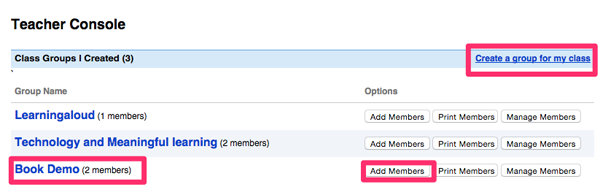
The Teacher Console allows you to create a group for your class. In this case, I have created the group "Book Demo". One of the options associated with the group allows the addition of members.
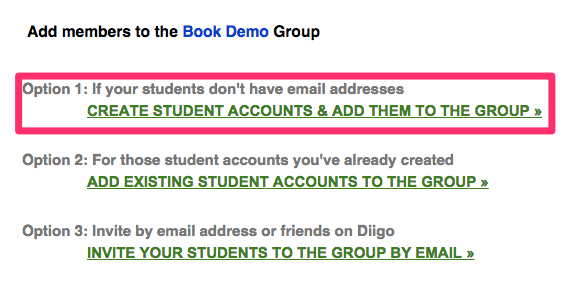
There are several options for adding students to a group. One option allows the teacher to enter all students in a form.
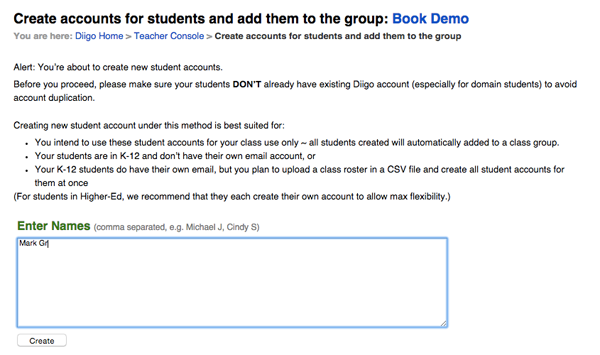
In this option, the teacher uses a textbook to enter the names (only one name in this case). It is recommended you do not use the full name.
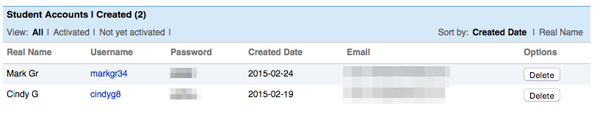
Diigo creates a username and password for each student. The students could connect to their accounts and change the username and password these values, but the teacher console would offer the teacher this information if updated by the student.
From this point, the student experience is very to that of an adult user of Diigo. They can create bookmarks and explore the bookmarks of others in their student group.
del.icio.us is one of the most popular and easy to use bookmarking sites. The information saved within del.icio.us is nearly identical to that described in our description of Scuttle. del.icio.us can be triggered from a browser toolbar bookmarklet. It is possible to set up an RSS feed associated with del.icio.us tags. The feed would allow you to follow the bookmarks that are added that have been tagged with the term that interests you.