
Why Emphasize LOGO?
In this chapter we emphasize the LOGO programming language because it allows discussion of the whole range of potential programming benefits and because we can direct you to way to explore this language on your own. LOGO is a language for developing programming skill and possibly for developing content-area knowledge and general problem-solving ability. It is somewhat unique because it has been taught at several grade levels and usually with students of a range of aptitudes. In comparison, other popular programming languages (BASIC and Java) seem frequently to be applied primarily as a way to develop programming skill. These languages are more likely to be taught in specialized courses for students with specialized interests.
Programming in LOGO
The customary method for introducing students or teachers to the LOGO language is through experiences with turtlegraphics. The most common version of turtlegraphics relies on a small-screen turtle that moves and draws on the computer screen. The screen turtle’s actions are controlled directly by commands issued from the keyboard or indirectly by programs constructed by a programmer. Examples of drawings created with turtlegraphics are scattered throughout the material that follows
| PRIMITIVE | EXAMPLE | ACTION |
| cleargraphic | CG | Clear screen |
| forward | FD 20 | Move ahead 20 steps |
| back | BK 20 | Move back 20 steps |
| right | RT 90 | Turn right 90 degrees |
| left | LT 90 | Turn left 90 degrees |
| penup | PU | Leave no trail |
| pendown | PD | Leave a trail |
| home | HOME | Return to center screen |
| hideturtle | HD | No turtle in graphic |
| show turtle | ST | Turtle visible |
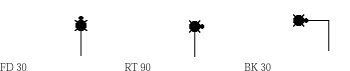
The individual commands in LOGO are called primitives. As is true with commands in all other programming languages, LOGO commands must follow an established syntax. The syntax for individual commands consists of rules for combining keywords, punctuation, and arguments. In LOGO, commands follow the format keyword [space] argument. For example, if you wanted the turtle to move ahead thirty turtle steps, you would issue the command forward 30 (abbreviated as FD 30). In this example, the keyword is forward (or FD), the punctuation is a space, and the argument is the number 30. Expressions such as 30FD, 30 FD, or FD30 are incorrect and will not work. If all of this seems unnecessarily complex for young children, just stop to think about the rules they follow in writing English. Whereas young students would probably be unable to apply appropriate terms to the components of a LOGO command, they are quite capable of learning and following the rules necessary for constructing commands the computer can interpret.
Primitives and results
We strongly encourage you to take the time to experience programming. The best way to appreciate LOGO is to spend some time at a computer exploring the features of the language. As you begin, contemplate your own thinking. Insights you have about your own thinking might be helpful when you work later with other beginners. You might want to consider the following questions. What about your experiences do you find frustrating or exciting? What approach do you take when something does not work as expected? How do you feel when you finally solve a problem that has stumped you for some time? (One of us has been known to cheer and punch his fist in the air!)