

Building a Program with Procedures
LOGO allows one procedure to "call" another procedure. That is, once a procedure has been written, the action it generates can be called by inserting the name of the procedure within a second procedure. Sometimes the main program or procedure is called a superprocedure, and the building block procedures are called subprocedures. Often the superprocedure is very simple, consisting of only a series of procedure names (subprocedures). This method is efficient because it allows the programmer to isolate tasks and work on them as manageable units. As we point out later, the ability to identify problem subgoals is also an important general problem-solving skill. Experience with programs that use subprocedures may help students develop this technique for handling complex problems.
A procedure in LOGO can even call itself. This is accomplished by inserting the name of the procedure within the procedure. When the procedure is activated, the computer executes each command it encounters until it reaches the procedure name. When the computer encounters the name of any procedure, it begins to execute that procedure. In this case, this amounts to starting the sequence of actions generated by the procedure all over again. This special method is called recursion. Recursion is an idea that students find extremely intriguing and love to explore (Papert, 1980). The idea of a self-perpetuating process is just fascinating. For example, consider the childhood riddle: If you have two wishes, what would your second wish be? The answer is: Two more wishes (or make one wish and then wish for two more wishes). If you could express the riddle as a procedure, it would look something like this:
TO WISH
MAKE WISH1
WISH
END
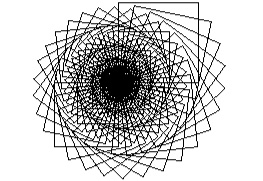
Recursion can also be demonstrated as a way to extend and produce some interesting effects with procedures that have already been written. The procedure that follows uses SQUARE. There are no repeats in this procedure, but many squares of decreasing size have been drawn. In fact, an IF statement was included to stop the program from going on and on. The results are shown below.
TO BLACKHOLE :SIDE
SQUARE :SIDE
RT 12
Make "SIDE :SIDE*.985
IF :SIDE.5 [STOP]
BLACKHOLE :SIDE
END
Result of Blackhole procedure
Now that you have had a brief exposure to the kinds of programming that younger students might do, the question becomes what these experiences accomplish. The remainder of this chapter addresses this question.